
Google AI Overviews Optimization

What You Will Learn in This Guide:
This guide will give you the complete blueprint to stay visible in the era of Google AI Overview
Introduction to Google AI Overviews
Today, with AI Overviews, Google is becoming a researcher. Instead of just providing a list of links, it reads the books for you and summarizes the answers right at the top of the page.
What Are Google AI Overviews?
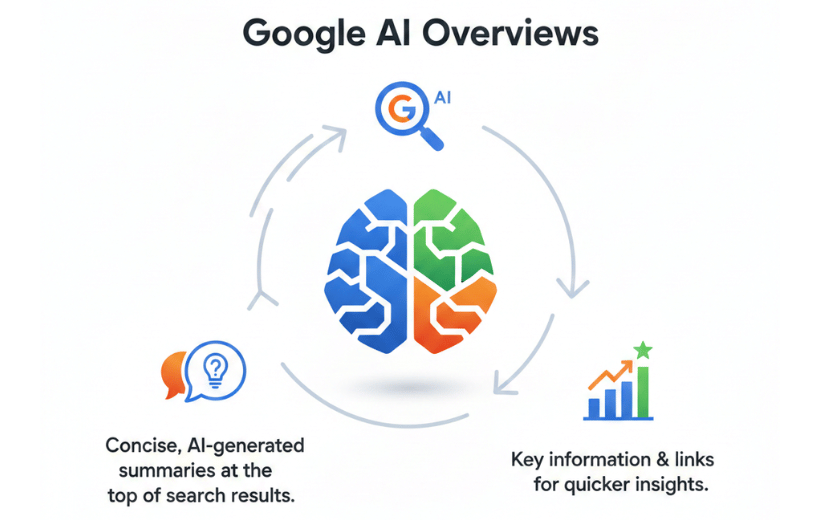
Google AI Overviews (formerly known as SGE) changes that completely. Instead of just giving you a map to the library, Google now acts like a smart librarian who reads the books for you.
It uses artificial intelligence to scan multiple sources and generate a single, easy-to-read summary right at the top of the results page. It answers complex questions instantly, so users get the20p “gist” without needing to click around
How the AI “Thinks” and Reads
To generate these summaries, Google uses Large Language Model (LLM) technology similar to ChatGPT, but pairs it with its trusted ranking systems.
Google no longer just looks for matching keywords. It tries to understand the meaning.
- It reads: It examines how topics connect.
- It judges structure: It prefers content that is organized and factually sound.
- It acts like a human reader: If your content is messy or vague, the AI will ignore it.
If AI can’t clearly understand and summarize your content, it won’t surface in AI Overviews, regardless of traditional rankings.
How Google Synthesizes Answers
When you ask a question, the AI scans top-tier sources, pulls out the key facts, and blends them into a neutral, easy-to-read paragraph. It then cites its sources (often via link cards).
To get your content included in these summaries, you must:
- Be Direct: Answer questions in the first sentence.
- Be Scannable: Use bullet points and clear headings.
- Be Trustworthy: Back up claims with expertise (E-E-A-T).
If a human has to squint to find your main point, the AI won’t find it at all.
The New SEO Reality: Being “Reference-Worthy”
Old-school SEO was about fighting for the #1 slot using exact keywords and backlink volume. While those still matter, the game has evolved.
- Old Goal: Rank high enough to get a click.
- New Goal: Be clear enough to get cited.
We are moving from “ranking content” to creating “reference-worthy content.” Google prioritizes clarity over cleverness. If you explain a concept better than anyone else, you become the source that the AI quotes.
What This Means for Your Traffic
Many site owners worry that AI summaries will steal their clicks. The reality is more nuanced:
- Volume vs. Value: You might get fewer casual clicks, but the people who do click your link in an AI Overview are usually looking for deep dives. They are “high-intent” visitors.
- Authority: Being cited in an AI Overview is a massive stamp of approval for your brand’s credibility.
- Engagement: Writing for AI (clear, structured, helpful) naturally makes your content better for human readers, too.
You shouldn’t wait for your traffic to drop to change your strategy. Optimizing for AI Overviews is simply the new standard for good SEO.
Why AI Overviews Optimization Matters
Here is why fighting for a spot in the AI Overview is crucial for your growth:
- AI Overviews appear at the very top of the page, often referred to as “Position Zero.” This is the VIP section of search results; if you aren’t there, users might never scroll down to see you.
- As users get answers directly on the result page, they click fewer links. You need to be the source Google cites in that overview to capture that traffic.
- When Google trusts your content enough to use it in its AI summary, it signals to users that you are a credible industry leader.
- In a mobile-first world, the AI Overview occupies most of the screen. Securing this spot guarantees your content is seen before competitors.
How AI Overviews Work
Here is the breakdown of how the machine reads, understands, and synthesizes your content.
Sources & Data Synthesis
Google’s AI doesn’t just copy-paste text from the #1 search result. It functions more like a research journalist. When a user asks a question, the AI:
- Retrieves several relevant pages (not just one).
- Cross-references facts across those pages to find patterns.
- Synthesizes a single answer based on the “consensus” of those sources
Why this matters: The AI looks for agreement. If five trusted sites say “A,” and your site says “B,” the AI will likely ignore you. To be included, your content must align with widely accepted facts and definitions.
The shift from “Rankable” to “Extractable.
In the past, you wrote to rank. Now, you must write to be extracted. Google is scanning your page for specific data points that it can easily extract and utilize. It prefers:
- Clear definitions of concepts.
- Step-by-step logic.
- Sources that reinforce what other experts are saying.
The Knowledge Graph & Authority Signals
The backbone of these AI summaries is Google’s Knowledge Graph. This is Google’s internal database of “entities”: people, places, brands, and things.
If Google understands who you are and what you are talking about (entities), it is more confident in using your content. You can help the AI by clearly defining the relationships in your content (e.g., “Product X is a type of CRM software”).
Google’s systems are designed to avoid illusions (making things up). To do this, they lean heavily on authority signals:
- Domain Credibility: Is this site known for this topic?
- Expertise: Who wrote this? (Author credentials matter.)
- Citations: Do other trusted sites link to this information?
Eligibility & Schema Markup
Not every page gets invited to the AI party. Google applies strict filters to ensure the AI doesn’t give bad advice.
The 4 Pillars of Eligible Content
If you want your content to be picked up by the AI, it needs to pass these checks:
- Clarity: Did you answer the main question in the first paragraph?
- Readability: Is the language simple (plain English) and the paragraphs short?
- Authority: Does the content demonstrate deep expertise (E-E-A-T)?
- Freshness: Is the data current?
Think of Schema markup (structured data) as a translator. It takes your human-readable content and translates it into code that the machine can instantly understand.
- Using FAQ Schema tells the AI that “Here is a question, and here is the exact answer.”
- Using Article or Author Schema validates your credibility.
- While Schema doesn’t guarantee you a spot, it acts as a shortcut that makes it much easier for Google to process your page.
The “Zero-Click” Reality
AI Overviews accelerate the trend of “Zero-Click searches.” For simple questions (like “How tall is the Eiffel Tower?”), Users get the answer instantly without having to click anything.
This does not mean SEO is dead; it means the goalposts have moved. Instead of fighting for clicks on simple queries, brands are now competing for an AI overview.
- If your brand is cited in the AI Overview, you are positioned as the authority.
- Even without a click, the user sees your name associated with the correct answer.
The focus must shift from “Traffic Volume” to “Share of Voice.” You are no longer just optimizing for a ranking position; you are optimizing to be the reference source that the AI trusts enough to quote.
7 Smart Ways to Get Your Content into Google AI Overviews
Google AI Overviews are not a coincidence. It is impossible to “trick” the system. Rather, you succeed by becoming the most beneficial and well-organized online resource.
Follow these seven principles to help Google’s AI find and feature your work.
1. Give the Answer Immediately
AI wants to help people fast. If a user asks a question, don’t make them hunt for the answer.
- The Golden Rule: Start your page with a clear, direct answer.
- Go Deep: After giving the quick answer, explain the “how” and “why.”
- Be the Expert: Use real-life examples and facts that general websites might miss.
2. Answer Real User Questions Early
Most people search by asking a question. If you answer these questions at the top of your page, both humans and AI will notice.
- Matching: Use headings (H2 or H3) that closely resemble the questions people type into Google.
- Quick Summaries: Place a “Fast Facts” or “Key Takeaways” box near the top of your article.
3. Structure Your Content for Easy Reading
AI “reads” your page by looking for structure. If your page is a messy wall of text, the AI will move on to someone else.
- Use Lists: Turn long sentences into bullet points or numbered steps.
- Break It Up: Use short paragraphs and clear headings.
- Be Logical: Ensure your sections follow a logical order, similar to a story with a clear beginning, middle, and end.
4. Use Schema Markup (Digital Labels)
Think of Schema as a set of labels that tell Google exactly what is on your page. It helps the AI process your data without any guesswork.
- FAQ Labels: Use these for question-and-answer sections.
- How-To Labels: Use these for step-by-step guides.
- Article Labels: Use these to help Google identify your blog posts quickly
5. Strengthen Your Core SEO
Google AI usually pulls information from the top-ranked websites. If you don’t rank well in standard search, you likely won’t show up in the AI Overview.
- Speed Matters: Ensure your site loads quickly on mobile phones.
- Earn Links: When other trusted sites link to you, it tells Google you are a leader in your field.
- Keywords: Use the words your audience actually uses.
6. Show Trust and Real Experience
AI systems prefer facts over opinions. They look for content that is safe, accurate, and backed by evidence.
- Link Out: Link to official studies or famous experts to back up your claims.
- Fact-Check: Double-check your numbers and dates.
- Show Experience: Write about things you have actually done or tested.
7. Track and Improve Your Performance
You can’t improve what you don’t track. Use tools like Google Search Console to see how often you appear in AI results.
- Spot Trends: Look for which questions trigger an AI response.
- Update: If you see your rankings drop, refresh your content with newer facts.
- Test: Try different layouts to see which one the AI likes best.
Common Mistakes in AI Overviews Optimization
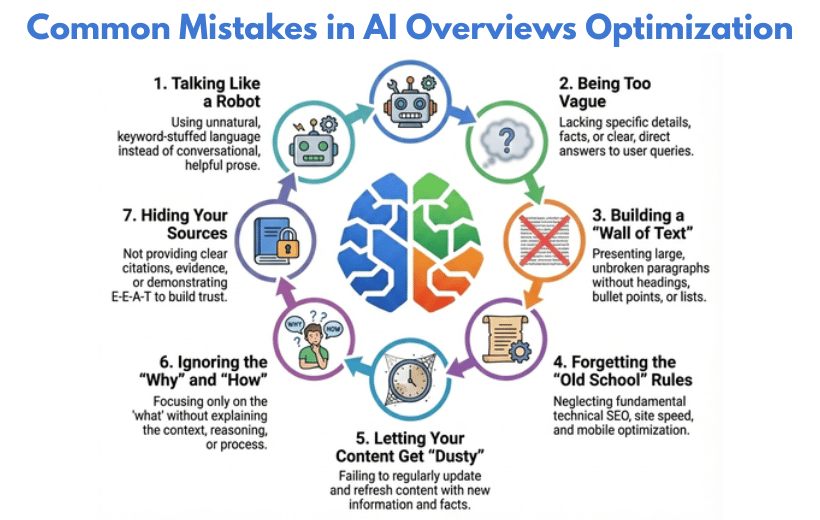
In the new world of AI search, many websites aren’t losing visibility because they lack content; they are losing because they are playing by the old rules. Tactics that were used to boost rankings five years ago act as “stop signs” for modern AI systems.
1. Writing for Keywords, Not Humans
Some writers try to trick the computer by using the same word 50 times. This is called “keyword stuffing,” and it’s a bad idea.
- The Problem: The text sounds weird and boring.
- The Fix: Write for real people. Use a friendly tone and focus on being helpful.
2. Providing Shallow or Incomplete Answers
If you ask a question and get a tiny, one-sentence answer, you probably aren’t happy. AI feels the same way.
- The Problem: Your content is “thin” and doesn’t explain much.
- The Fix: Be the expert! Give examples, tell stories, and explain the “why” behind your answer.
3. Creating Long, Hard-to-Read Text Blocks
Imagine opening a book and seeing one giant paragraph that covers the whole page. You would probably close it immediately.
- The Problem: Long blocks of text are hard to read.
- The Fix: Use bullet points, short sentences, and bold headings. Make it easy for someone to skim your page in five seconds.
4. Ignoring Basic SEO Fundamentals
Some people think AI changed everything. It didn’t! You still need a website that works well.
- The Problem: Your site is slow or doesn’t work on phones.
- The Fix: Keep doing the basics. Make your site fast, fix broken links, and use clear titles.
5. Publishing Outdated Content
Information changes fast. If you wrote a guide about the “best phones” three years ago, it’s now out of date.
- The Problem: AI doesn’t trust old, stale facts.
- The Fix: Update your posts often. Add a “Last Updated” date so both users and AI know the info is up to date.
6. Not Matching Real Search Questions
AI looks for content that answers exactly what people are typing into search bars.
- The Problem: You use fancy titles that nobody actually searches for.
- The Fix: Use real questions as your headings. Instead of “Footwear Options,” use “What are the best shoes for running?”
7. Missing or Weak Source References
AI wants to make sure it isn’t sharing “fake news.” It looks for proof.
- The Problem: You make claims but don’t cite your sources.
- The Fix: Link to trusted websites. Add quotes from experts and show that you did your homework.
To win with AI, stop looking for shortcuts. Focus on being clear, helpful, and honest. If you make your content great for humans, the AI will love it too!
Advanced Strategies for AI Overviews Optimization
To move from “eligible” to “essential,” you need to prove to the AI that you don’t just know the answer; you own the topic.
1. Focus on Question-Based Keywords
Not every search triggers an AI answer. Focus your energy on keywords where people are trying to learn something.
- The Strategy: Target “Intent” words. Look for queries that start with How, What, Why, and Best.
- The Goal: AI loves to summarize these topics, making them the easiest “wins” for your site.
2. Be the Most Helpful, Not the Longest
In the past, SEOs thought “longer is better.” With AI, that has changed. AI looks for the most helpful answer, not the one with the most words.
- Be a Simplifier: Use clear language and real-world examples.
- Cut the Fluff: If a sentence doesn’t add value, delete it. AI rewards clarity, not word counts.
3. Create “Grab-and-Go” Content for AI
Google’s AI often “grabs” specific parts of a page to show users. If your content is easy to snatch, you are more likely to be featured.
- Use Comparison Tables: AI loves to pull data from tables.
- Define Terms: Put a 1-sentence definition right under a heading.
- Use Numbered Steps: This makes it easy for AI to build a “How-To” list for the user
4. Strengthen Your On-Page SEO Engine
Technical details still matter. If your “engine” is broken, the AI won’t even look at your content.
- Internal Links: Link your new posts to your old ones. This helps AI find its way around your site.
- Speed & Mobile: Make sure your images are small so the page loads instantly. AI favors sites that provide a smooth experience.
5. Build Strong Online Authority
Authority is a huge factor. If big, famous websites talk about you, Google’s AI is more likely to trust your facts.
- Digital PR: Share original data or new studies. When other experts cite your work, your “trust score” goes up.
- Expert Voice: Make sure your content sounds like it was written by someone who truly knows the topic.
6. Monitor, Learn, and Improve Continuously
AI search results change every day. You cannot “set it and forget it.”
- Track Your Success: Use tools like Google Search Console to see which pages are actually appearing in AI boxes.
- Find the Gaps: If you see a page that is almost featured, go back and make the answer even clearer.
Real-Life Example of Getting a Smartphone Site into AI Overviews
Once you have mastered the basics, clarity, structure, and schema, it is time to play the long game. The difference between a page that gets lucky and a site that dominates the AI results is Topical Authority.
To move from “eligible” to “essential,” you need to prove to the AI that you don’t just know the answer; you own the topic.
1. Build a “Main Hub” Page
Start by creating one big, high-quality guide. This page should be the “home base” for your topic.
Page Title: The Ultimate Guide to Picking the Best Smartphone in 2025
What to Include:
- What makes a phone “good” (battery, camera, screen).
- New AI features in the latest models.
- Tips for different people (students, gamers, or workers).
Why it works: This page proves to Google that you are an expert on the entire subject.
2. Create Smaller “Support” Articles
Next, write shorter articles that focus on one specific detail. These help you cover every possible question a user might have.
- Article A: What Is a Phone Processor? (And Why You Should Care)
- Article B: The 5 Best Phones for Great Photos in 2025
- Article C: Android vs. iPhone: Which One is Right for You?
The Pro Move: Make sure every small article has a link that points back to your “Main Hub” page. Use natural phrases like “check out our full phone guide” for these links.
3. Use Charts and Quick Lists
AI loves data that is easy to sort. Don’t just write long paragraphs; use visuals.
- Comparison Tables: Create a chart showing the price and battery life of different phones.
- Pros and Cons: Use bullet points to show what is good and bad about a specific model.
- Quick Facts: Add a “Fast Specs” box at the top of your reviews.
Why it works: AI systems can grab these charts and lists easily to show them in a search result.
4. Keep Your Info Fresh
Tech changes every month. If your page is out of date, Google’s AI will stop using it.
- Add New Models: When a new phone comes out, add it to your guide immediately.
- Update the Date: Make sure the “Last Updated” date on your page is recent.
- Fix Old Prices: Keep your data accurate so the AI knows it can trust you.
Why this matters: Fresh updates help Google’s AI trust and reuse your content.
The Final Result
By building this “web” of connected articles, you become a trusted authority. Google’s AI learns that your site is the best place for accurate, up-to-date phone info.
Instead of just showing your website in a list of links, the AI will start reading your text and citing your site as the main source for users’ questions.
✦ AI Overviews Optimization Checklist
Before you hit publish, run your content through this final filter. This checklist ensures you aren’t just writing for the search bar of the past, but optimizing for the Answer Engine of the future.
Content Check (Human-Centric)
- Does your content sound natural? Rewrite robot-like phrasing.
- Answer the main user question in the first 2–3 sentences.
- Ensure main points are clear via subheadings & bullets alone.
Structure Check (Machine-Readable)
- Use proper H2/H3 hierarchy; don’t skip levels.
- Implement correct Schema Markup (FAQ, Article, or HowTo).
- Break complex data into lists or tables for easy extraction.
Trust Check (Authority Signals)
- Link to credible external sources to back up facts.
- Include internal links to relevant topic clusters.
- Identify the author and provide unique insights.
Technical Check (Performance)
- Instant load times (Core Web Vitals checked).
- Optimized for mobile-first AI indexing.
- Zero broken links or technical code errors.
Maintenance Check (Longevity)
- Revisit content every 3–6 months to update data.
- Track AI impressions and visibility, not just clicks.
Conclusion
Optimizing for AI Overviews strengthens long-term authority, protects organic visibility, and aligns content with real user intent. While traffic patterns may change, brands that adapt early gain trust, recognition, and consistent presence in AI-driven search experiences. The future of SEO belongs to content that educates first, structures clearly, and earns its place as a reliable source for AI answers.
Is Your Brand Ready for Google Ai overview?
Find out whether AI systems will cite or skip your content.
Get your AI Readiness Score in minutes.
✓ Covers ChatGPT, Claude, Gemini & Perplexity
✓ No Technical Skills Required
FAQs
How do you optimize for Google AI Overviews (AIO)?
Optimization for AIO requires a shift from keyword density to topical authority and NLP (Natural Language Processing).
- The “Lead” Method: State the answer to the user’s query in the first 50 words of your content.
- Semantic Clustering: Organize content using clear H2s and H3s that mirror how a human would ask follow-up questions.
- Data Formatting: Use tables, bullet points, and numbered lists. Google’s Gemini model prefers structured data that it can easily “scrape” and present.
- RKWeb Tip: Don’t just answer the “what”; answer the “why” and “how” to provide the depth AI models look for.
How do you "beat" or stay ahead of Google AI Overviews?
You “beat” the AI by providing what it cannot: First-hand experience (The extra ‘E’ in E-E-A-T). While AI summarizes existing data, it cannot provide original case studies, personal expert opinions, or real-time experimental data. To maintain your traffic, focus on “Information Gain” adding new facts or perspectives that don’t exist elsewhere on the web.
How can a brand trigger Google’s AI Overview?
- Identify “Question-based” keywords in your niche.
- Implement FAQ Schema and Article Schema to make your data machine-readable.
- Ensure your site speed and Core Web Vitals are optimized; Google is less likely to cite a slow, poorly performing site in its AI summary.
Is Google still using AI Overviews for all searches?
As of 2026 updates, Google has refined its approach. AI Overviews now appear primarily for complex, multi-step queries where a summary adds value. For “Navigational” searches (e.g., “Facebook login”) or “Transactional” searches with clear intent, Google often sticks to traditional results to save on the high computational costs of AI.
What is the recommended AI Overviews strategy?
- Be the Reference: Use clear, declarative statements (e.g., “The best way to X is Y”).
- Brand Authority: Build strong backlinks from high-authority niche sites so Google views your brand as a “Trusted Seed” for AI training data.
- Visual SEO: Optimize images and videos, as AI Overviews are increasingly including visual carousels.
Will AI Overviews lead to a total loss of organic traffic?
While “zero-click” searches are increasing for simple queries, AIO is actually a high-quality filter. Users who click through from an AI Overview citation are often further down the funnel and more likely to convert, as the AI has already “pre-qualified” your content as the best answer.
Does E-E-A-T (Experience, Expertise, Authoritativeness, Trust) matter for AI SEO?
It matters more than ever. Google’s AI models prioritize sources that have a clear author with a proven track record. For RKWeb, we recommend strengthening Author Bios and linking to verified social profiles to prove to the AI that a human expert wrote the content.
How do I track my website’s visibility in AI Overviews?
- Search Console: Look for “Queries” with high impressions but fluctuating positions.
- Specialized Tools: Use AI-tracking features in tools like Semrush, Ahrefs, or specialized AIO trackers like ZipTie
- Brand Mentions: Track how often your brand name appears within the AI summary text itself.
Pramod Ram
Head of SEO, AIO, and Founder, RK Web SolutionsFounder of RK Web Solutions, specializing in SEO, AIO, AEO, GEO, and AI-first search strategies. With 14+ years of experience, he helps brands build visibility in the AI-driven search ecosystem, moving beyond traditional rankings to become a trusted source for AI-generated answers.
Related Posts
Why Some Brands Don’t Appear in “Top 10 Lists” but Still Win in AI-Driven Search
TL;DR Not appearing in “Top 10” lists does not mean a brand lacks visibility in AI-driven search. AI systems do not rank companies based on curated lists or popularity. They select sources based on clarity, consistency, and how well content explains a topic. Brands...
The Future of GEO: How AI Changes Brand Discovery in 2026 & Beyond
The Future of GEO: How AI Changes Brand Discovery in 2026 & BeyondWe have now officially entered the AI Discovery Era, a world where people no longer “search” with keywords. They simply ask AI questions in natural language. Instead of showing a list of links, AI...
Ranking Factors for AI Search Engines (2025 Study)
Ranking Factors for AI Search Engines (2025 Study)AI search engines are transforming the way content is searched, evaluated, and cited. AI search changes how information is consumed, but it still relies on the foundations of traditional SEO. While core SEO signals...